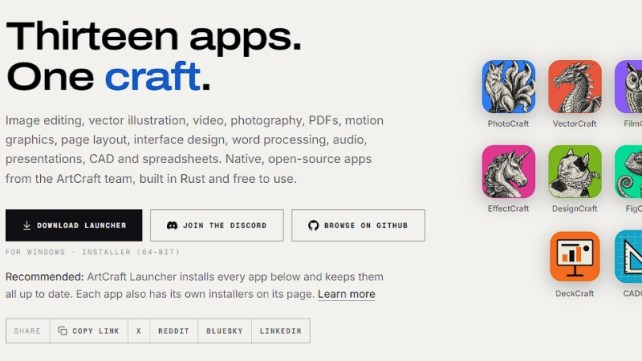
Creative software has long followed a familiar pattern. Professionals rely on a handful of heavyweight applications for image editing, vector illustration, video, page layout, audio, CAD and documents. Those tools tend to be subscription-based, closed-source and cloud-connected, and they’re often built on web-based or cross-platform wrappers that trade performance for convenience.
ArtCraft’s Crafting Apps initiative challenges that model. The ArtCraft team, best known for its open-source studio for controllable AI image and video, is building thirteen native, open-source creative and productivity apps, all written in Rust and free to use. The tagline is “Thirteen apps. One craft.”
This post covers what the apps are, the principles behind them, how far along they are, and why the project matters.
What Is ArtCraft?
ArtCraft describes itself as “the open-source studio for controllable AI image and video.” Its main product lets people create images and video with AI. The Crafting Apps collection extends the same open-source, artist-first philosophy beyond generative AI into traditional creative and productivity tools. The site’s footer carries the motto “Made by artists, for artists.”
The code lives under the storytold organization on GitHub, and the team runs an active Discord community where early builds, roadmaps and discussion happen.
The Six Principles
Every Crafting App is “written from scratch in Rust and held to the same rules.” These six principles explain the philosophy better than any feature list.
1. Open source
Every line of code is on GitHub under permissive licenses. You can read it, fork it and build on it. For creative professionals who have lived with opaque, proprietary formats and unpredictable licensing changes, that’s a meaningful promise.
2. Native, not wrapped
The apps are pure Rust, compiled to real desktop applications for macOS, Windows and Linux, with no Electron and no web views. Native apps generally start faster, use less memory and respond more smoothly. That matters most for heavy workloads like video timelines, raw photo development and large CAD drawings.
3. Familiar from day one
The team aims for layouts, tools and shortcuts that working professionals already know, so there’s “nothing to relearn.” This is a pragmatic choice. Most open-source alternatives lose users not on features but on unfamiliar workflows. By deliberately matching established conventions, the project lowers the cost of switching.
4. Your files, your machine
Everything runs locally on your own files, with no cloud round-trips between you and your work. That means better privacy, offline use, no dependence on someone else’s servers and no surprise lock-in.
5. Agent-ready
Each app can be driven through a CLI, a JSON control channel or an MCP server. That makes them scriptable and automatable, and well suited to AI agents. In an era when people increasingly want assistants to operate software on their behalf, building that in from the start is a forward-looking design decision. An agent could batch-process photos, assemble a PDF or generate slides without screen-scraping a GUI.
6. Also in your browser
Twelve of the apps also compile to WebAssembly and run in a browser tab: PhotoCraft, VectorCraft, LightCraft, PdfCraft, EffectCraft, DesignCraft, FigCraft, WordCraft, SoundCraft, DeckCraft, CADCraft and GridCraft. FilmCraft is the one not listed for web. You get a native app when you want performance and a browser version when you want zero installation.
The Lineup: A Tour of All Thirteen Apps
01 · PhotoCraft: Image editing (Early alpha)
Billed as “the open-source image editor you already know how to use.” The showcase shows a Layers panel, Curves adjustments and type layers on a classic woodblock print. It’s the flagship for raster editing and probably the app most people will try first. Installers are available for macOS, Windows and Linux, and there’s a web version.
02 · VectorCraft: Vector illustration (In development)
Described as “fast, open-source vector illustration, reimagined in pure Rust.” The preview shows a poster design with live outer-glow effects in an Appearance panel and character settings in a Properties panel, which suggests a non-destructive, appearance-based workflow. Desktop installers and web are available.
03 · FilmCraft: Video editing (In development)
“Professional, open-source video editing, rebuilt from scratch in Rust.” The screenshot shows video scopes, a program monitor and a multi-track timeline, the core of any serious non-linear editor. It has desktop installers but no web version listed, which makes sense given the demands of video.
04 · LightCraft: Photo library and raw developer (In development)
An open-source photo library and raw developer “that runs on your machine.” The preview shows a landscape photograph being developed with light and effects sliders, the classic catalog-plus-develop workflow for photographers. It runs on desktop and in the browser.
05 · PdfCraft: PDF workbench (Early alpha)
“Read, organize, combine, split and secure.” The screenshot shows an “All tools” panel and threaded comments. PDFs are a daily necessity, and a free, local, open-source workbench is appealing, especially when many people upload sensitive documents to random online tools.
06 · EffectCraft: Motion graphics and VFX (In development)
Open-source motion graphics and visual effects, built in pure Rust. The preview shows a composition panel with an animated title, a project panel, a layered timeline of text, shape and solid layers, and a properties panel. This is the compositing and animation category, historically one of the most expensive in the creative world.
07 · DesignCraft: Page layout and publishing (In development)
“Open-source page layout and publishing, rebuilt in pure Rust.” The showcase is a magazine spread with a threaded three-column story, a text-wrapped pull quote and text-frame options. That points to proper desktop-publishing features such as linked frames and text wrap.
08 · FigCraft: Interface design (Early alpha)
Open-source interface design and prototyping. The screenshot shows a hiking-app design with multiple phone screens, component instances, an auto-layout layers tree, Fill and Hug sizing, and a theme variable mode. That’s a modern UI-design feature set: components, auto layout and variables.
09 · WordCraft: Word processing (In development)
“Fast, open-source word processing, rebuilt in pure Rust.” The preview shows a ribbon interface, a navigation pane and a styles gallery with live previews, a clear nod to the familiar layout most office users already know.
10 · SoundCraft: Digital audio workstation (In development)
“Professional audio recording, editing and mixing in pure Rust.” The Edit window shows waveforms, MIDI tracks, rulers, markers and transport controls for a multi-track session. Audio is latency-sensitive, so a native Rust DAW is a natural fit.
11 · DeckCraft: Presentations (In development)
Build and deliver dynamic slide presentations. The preview shows slide thumbnails, a notes panel and a vector process diagram on the canvas.
12 · CADCraft: Computer-aided design and drafting (In development)
“Fast, open-source computer-aided design and drafting.” The showcase is an architectural floor plan with wall hatching, room schedules, dimensions and a command line, a detail that suggests CAD veterans’ muscle memory is respected.
13 · GridCraft: Spreadsheets and data analysis (In development)
A spreadsheet app with a sales dashboard featuring conditional formatting, sparklines, and column and pie charts. It rounds out the suite with the productivity staple.
Where Things Stand: An Honest Status Check
It’s important to be clear about maturity. According to the ArtCraft page:
- Early alpha: PhotoCraft, PdfCraft and FigCraft
- In development: the other ten apps
All thirteen currently show installers ready for macOS, Windows and Linux. So you can try them, but you should expect rough edges, missing features and breaking changes. These are not yet drop-in replacements for the tools professionals use to meet client deadlines. This is a project to follow, test and contribute to now, and perhaps depend on later.
Getting Started: The ArtCraft Launcher
The recommended way to get the apps is the ArtCraft Launcher, which installs every app and keeps them up to date. It’s available from the project’s GitHub releases (the page links to version 0.3.2 at the time of writing). Each app also has its own installers on its individual page if you only want one.
For the browser versions, visit the app pages at getartcraft.com/apps and launch the web build where available.
Why This Project Matters
1. Rust as a foundation for creative software. Rust offers memory safety and strong performance without a garbage collector, which suits applications that process large images, video frames and audio buffers in real time. Writing everything natively avoids the overhead of embedded browsers.
2. A shared architecture across apps. Building thirteen apps under one roof in one language invites shared components, consistent behavior and a common automation interface. The uniform CLI, JSON and MCP control story across all apps is the kind of consistency that is hard to achieve when tools come from different vendors.
3. Automation and AI agents as first-class citizens. Most traditional creative software was designed for humans clicking buttons, and automation was bolted on later. Here, programmatic control is a stated design goal. That could enable workflows where an AI assistant edits, exports and organizes files across several apps.
4. Local-first, privacy-friendly work. Your files never have to leave your machine. For journalists, lawyers, studios under NDA and anyone who dislikes mandatory cloud accounts, that’s a real advantage.
5. Lowering barriers. Free, permissively licensed software removes the subscription barrier for students, hobbyists and independent creators, and the permissive licensing lets others build on the work.
Challenges and Open Questions
A balanced view should acknowledge the hurdles:
- Scope is enormous. Mature versions of any one of these app categories took large teams years to build. Thirteen at once is ambitious, and community contribution will be critical.
- File-format compatibility. Real adoption depends on opening and saving the formats people already use. The “familiar” principle will be tested here.
- Feature depth. Professionals rely on long-tail features. Reaching parity takes time.
- Sustainability. Open-source projects need funding, contributors and maintainers over the long term.
None of these are criticisms so much as the realistic questions any project of this size faces.
How to Get Involved
- Download the Launcher from the project’s GitHub releases and try the apps.
- Browse the code on GitHub under the storytold organization.
- Join the ArtCraft Discord to test early builds, follow development and suggest what to rebuild next. The team says “more crafts” are on the way.
- Try the web versions if you don’t want to install anything.
- Contribute: report bugs, write documentation, submit code or share workflow feedback.
Conclusion
The Crafting Apps are one of the more ambitious open-source efforts in creative software right now: a unified family of native Rust applications covering image editing, vector art, video, photography, PDFs, motion graphics, layout, UI design, writing, audio, slides, CAD and spreadsheets. They’re local-first, scriptable by agents, available in the browser and free.
They’re also young. Most of the suite is still in development, and the real test will be whether it reaches the depth and reliability professionals demand. But the design principles are sound, the direction is compelling, and the project is open for anyone to read, fork and shape. If you care about the future of creative tools, it’s worth downloading the launcher and joining the conversation.